
System Architecture#
EngiAI is a sophisticated multi-agent AI system designed for mechanical engineering design and manufacturing workflows.
Overview#
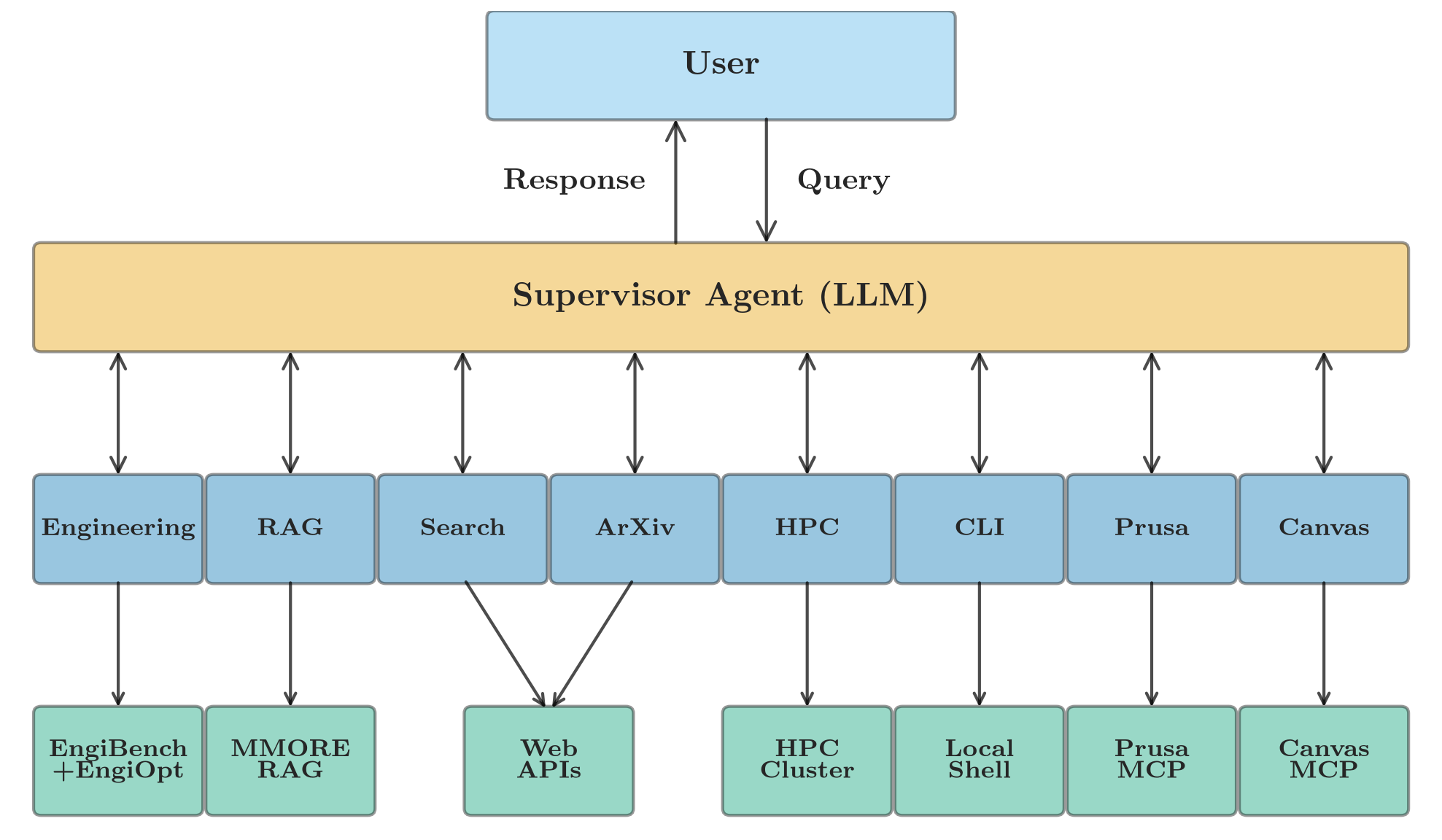
The system uses a supervisor-based multi-agent architecture where a central supervisor coordinates specialized agents, each with domain-specific tools and expertise.
Core Components#
1. User Interfaces#
Streamlit Web UI#
Location:
src/ui/streamlit_app.pyFeatures:
Interactive chat interface
Multi-chat session management with database persistence
File upload (PDFs, designs, data)
Real-time design visualization
Settings configuration
W&B report embedding
2. Supervisor Agent#
Module: src.agents.supervisor_agent
The supervisor is the entry point for all user requests. It:
Analyzes the user’s message
Determines which specialized agent should handle it
Routes the request to the appropriate agent
Coordinates multi-agent workflows when needed
Returns the final response to the user
Routing Logic:
Engineering design/optimization → Engineering Agent
Paper search/analysis → ArXiv Agent
Knowledge base queries → RAG Agent
Web research → Search Agent
HPC job management → HPC Agent
3D printing → Prusa Agent
Drawing and diagramming → Excalidraw Agent
Command execution → CLI Agent
3. Specialized Agents#
Each agent is autonomous and equipped with specific tools:
Engineering Agent#
Module: src.agents.engineering_agent
Handles structural design and optimization workflows.
Tools:
EngiBench optimization (beams2d, photonics2d) via unified problem registry
Design simulation and analysis with dynamic objective extraction
STL export for 3D printing
W&B model management (download, load, sample, evaluate)
Training command generation for HPC
Typical Workflow:
User: "Optimize a beam with 30% material"
  ↓
Engineering Agent creates problem → optimizes → renders → exports STL
RAG Agent#
Module: src.agents.rag_agent
Queries the knowledge base using Retrieval-Augmented Generation.
Tools:
MMORE multimodal document search
Document retrieval
Context-aware question answering
Workflow:
User: "What papers discuss topology optimization?"
  ↓
RAG Agent searches MMORE → retrieves relevant chunks → generates answer
ArXiv Agent#
Module: src.agents.arxiv_agent
Searches and analyzes research papers.
Tools:
ArXiv search API
Paper download
Metadata extraction
RAG-based analysis
Workflow:
User: "Find recent papers on generative design"
  ↓
ArXiv Agent searches arXiv → downloads papers → adds to RAG → summarizes
Search Agent#
Module: src.agents.search_agent
Performs web searches for technical information.
Tools:
DuckDuckGo web search (default) or Tavily (optional)
HPC Agent#
Module: src.agents.hpc_agent
Manages high-performance computing workflows.
Tools:
SSH connection to clusters
SLURM job submission
Job status monitoring
File transfer (SFTP)
Output retrieval
Workflow:
User: "Submit training job to Euler"
  ↓
HPC Agent generates SLURM script → uploads → submits → monitors
Prusa Agent#
Module: src.agents.prusa_agent
Controls 3D printers for rapid prototyping.
Tools:
Prusa Connect API (via MCP server)
Print job submission
Printer status monitoring
File upload
Integration: Uses MCP (Model Context Protocol) server for Prusa Connect.
CLI Agent#
Module: src.agents.cli_agent
Executes command-line operations.
Tools:
Shell command execution
PrusaSlicer invocation
File operations
4. Tools Layer#
Tools are reusable functions that agents use to complete tasks.
Key Tool Modules:
engibench.py- Engineering optimizationmmore_client.py- MMORE RAG service clientarxiv_tools.py- Paper searchsearch.py- Provider-neutral web searchhpc.py- SLURM operationsconnection.py- SSH/SFTP (Fabric)stl_export.py- 3D model generationcli.py- Command execution
Technology Stack#
Frameworks#
LangGraph: Agent orchestration and workflow management
LangChain: LLM interactions and tool binding
Streamlit: Web interface
Fabric: SSH/remote execution
Models#
LLMs: OpenAI GPT-4o/GPT-4.1, Google Gemini-3-Flash, Ollama (Qwen3, Qwen3.5)
Embeddings: sentence-transformers/all-MiniLM-L6-v2 (384-d, dense) blended with SPLADE sparse embeddings inside MMORE, reranked by BAAI/bge-reranker-base
Storage#
RAG Service: MMORE (multimodal document retrieval)
Relational DB: PostgreSQL or SQLite (for chat persistence)
File Storage: Local filesystem
External Integrations#
EngiBench: Topology optimization problems
Prusa Connect: 3D printer management
Weights & Biases: Experiment tracking
DuckDuckGo: Default keyless web search
Tavily: Optional keyed web-search backend
ArXiv API: Research papers
Data Flow#
Typical Request Flow#
1. User sends message
   ↓
2. Message received by UI (Streamlit/CLI)
   ↓
3. Supervisor Agent analyzes intent
   ↓
4. Supervisor routes to specialized agent
   ↓
5. Agent selects and executes tools
   ↓
6. Tools interact with external systems
   ↓
7. Results flow back through agent → supervisor
   ↓
8. Response displayed to user
State Management#
Conversation State (src.models.state):
User messages
Agent messages
Tool invocations
Current context
Session metadata
Persistence:
Chat history stored in database
Agent state serialized between turns
File outputs saved to
outputs/directory
Deployment Architectures#
Local Development#
┌─────────────┐
│  Developer  │
│   Machine   │
│             │
│  Conda Env  │
│  Streamlit  │
└─────────────┘
Docker Deployment#
┌──────────────────────────────────────┐
│          Docker Host                  │
│  ┌────────────────────────────────┐  │
│  │  Chatbot Container             │  │
│  │  - Streamlit UI                │  │
│  │  - All Agents                  │  │
│  │  - Tools                       │  │
│  └────────────┬───────────────────┘  │
│               │                       │
│  ┌────────────┴───────────────────┐  │
│  │  PostgreSQL Container          │  │
│  │  - Chat history                │  │
│  └────────────────────────────────┘  │
│               │                       │
│  ┌────────────┴───────────────────┐  │
│  │  Prusa MCP Server (optional)   │  │
│  │  - HTTP/SSE wrapper            │  │
│  │  - Prusa Connect integration   │  │
│  └────────────────────────────────┘  │
└──────────────────────────────────────┘
Docker + Host Service#
┌──────────────────────────────────────┐
│          Docker Host                  │
│  ┌────────────────────────────────┐  │
│  │  Chatbot Container             │  │
│  └────────────┬───────────────────┘  │
│               │ HTTP requests         │
│               ▼                       │
│  ┌────────────────────────────────┐  │
│  │  Host Service (localhost:9999) │  │
│  │  - Opens GUI apps              │  │
│  │  - PrusaSlicer, VS Code, etc.  │  │
│  └────────────────────────────────┘  │
└──────────────────────────────────────┘
Configuration#
All configuration via environment variables (.env file):
# Core
OPENAI_API_KEY=sk-...
TAVILY_API_KEY=tvly-...
LLM_MODEL=openai:gpt-4.1

# Database
DATABASE_URL=postgresql://user:pass@postgres:5432/engineer_assistant

# Optional Integrations
SKIP_MCP=true              # Disable Prusa integration
PRUSA_MCP_URL=http://prusa-mcp-server:8765
HOST_SERVICE_PORT=9999     # For GUI app launching
HPC_HOST_ALIAS=euler       # SSH config alias
Security Considerations#
API Keys: Stored in
.env, never committedSSH Keys: Mounted read-only, copied with proper permissions
Network Isolation: Docker containers on private network
Database: Credentials in environment variables
MCP Server: Optional, can be disabled
Performance Characteristics#
Response Time: 2-10 seconds (depends on LLM and tools used)
Concurrent Users: Supports multiple simultaneous chats
Document Search: Sub-second retrieval from MMORE service
HPC Operations: Asynchronous, non-blocking
File Operations: Handles PDFs up to 100MB
Extensibility#
Adding a New Agent#
Create agent file in
src/agents/Inherit from
BaseAgentDefine agent-specific tools
Add to supervisor’s routing logic
Update documentation
Adding a New Tool#
Create tool file in
src/tools/Decorate function with
@toolAdd comprehensive docstring
Bind to appropriate agent
Add tests
Adding a New Integration#
Add API client/SDK to dependencies
Create tool wrapper in
src/tools/Add environment variables to config
Document in configuration guide
Update deployment guides if needed
Monitoring and Debugging#
Logging#
Console output for development
File logs in
data/directoryLangSmith tracing (optional)
Debugging Tools#
Streamlit debug mode
Tool execution logs
Agent state inspection
Database query tools
Best Practices#
Agent Design: Keep agents focused on specific domains
Tool Design: Make tools atomic and reusable
Error Handling: Gracefully handle API failures
State Management: Keep state minimal and serializable
Documentation: Keep docstrings and guides updated
Further Reading#
Usage Guide - How to use each agent
Tool Reference - Available tools
API Reference - Code documentation
Deployment Guide - Production deployment